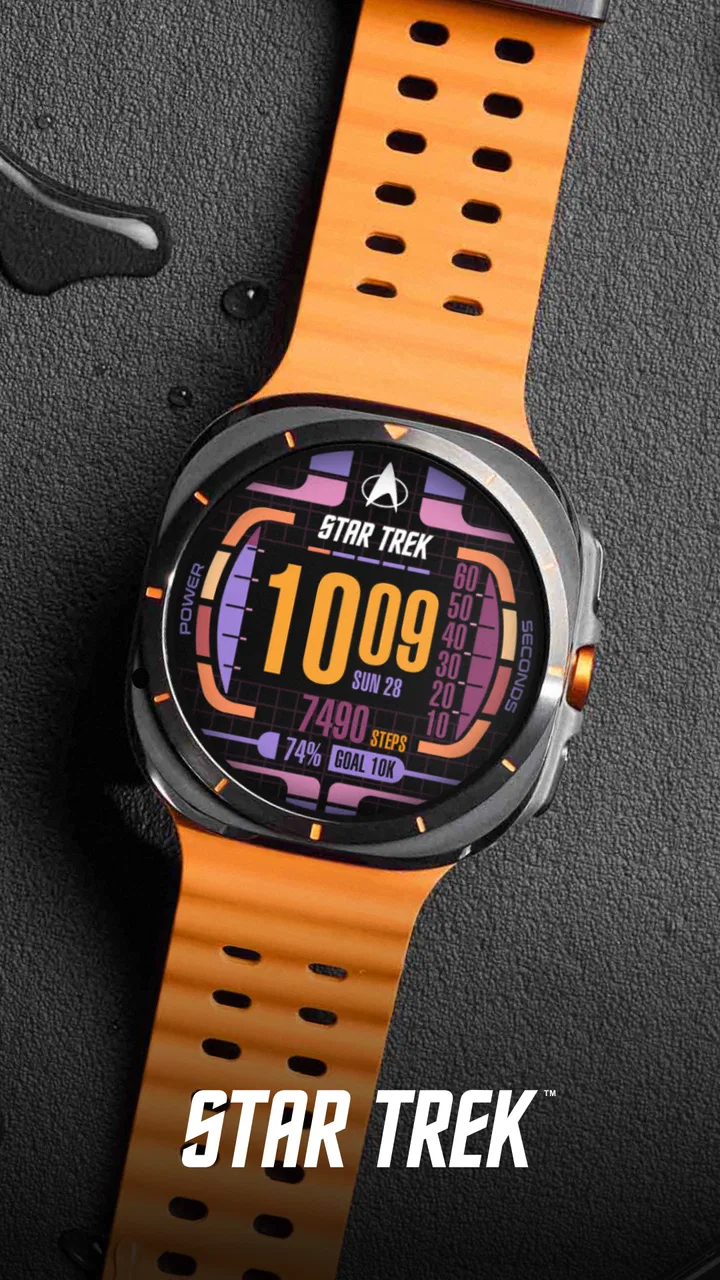
Star Trek LCARS SE Watch Face
- 4.4
- Rating
- 10.00K
- Installs
- $1.99
- Price
 Analysis by App-foxy
If you enjoy science-fiction design and want your Wear OS watch to feel less ordinary, Star Trek LCARS SE Watch Face is an appealing personalization app to consider. I approached it as a first-time user rather than as a collector already familiar with every Star Trek interface, and the main attraction was clear immediately: it gives the watch a visual identity inspired by the LCARS computer displays, with an animated presentation instead of a plain static dial.
That focus makes it quite different from a general watch-face collection. This is not trying to be a universal dashboard for every taste. It is a themed choice for someone who wants the watch on their wrist to look like part of a science-fiction world. Facer Studios developed it, and the app is listed for Everyone, so the concept is easy to understand even if you are new to wearable customization. The purchase price is $1.99, which feels reasonable if the LCARS style is already something you like, but less compelling if you are only looking for the most practical time display.
What to expect from the LCARS design
The first thing I noticed is that the watch face is built around atmosphere as much as information. LCARS-inspired panels, colored blocks and animated movement create a more distinctive result than the typical analog face or minimalist digital layout. It feels deliberately designed rather than like a standard dial with a science-fiction image placed behind it.
You May Also Like

 Pandora - Music & Podcasts
Pandora’s Music Is Easy to Start, but Harder to Recover
Pandora’s strength is its low-effort path from a seed to a station. Its weak spot is how much confidence it asks you to place in connection, setup, and quiet recovery.

 8 Ball Pool
 Is Built on Rivalries, Rematches, and Routine
A close look at the rivalries, rematches, shared routines, and unanswered safety questions that turn a quick pool match into a persistent mobile community.

 Samsung Music
’s Quiet Strength Is Playing What You Already Own
Its reach comes less from spectacle than from dependable access to a personal library. That simplicity is both the app’s strongest retention engine and its ceiling.

 AccuWeather: Weather Radar
AccuWeather Review: A Quick, Clear Forecast for Everyday Decisions
For everyday plans, the best forecast is the one you can understand quickly. AccuWeather makes rain timing, radar, and local conditions easy to act on, with a few trade-offs.

 Hill Climb Racing
Why Hill Climb Racing Still Turns Crashes Into One More Run
A tiny car, a bumpy hill and one more upgrade: Hill Climb Racing keeps resurfacing because its simple chaos makes every near-miss feel personal.

 AliExpress - Shopping App
AliExpress Makes Global Shopping Feel Personal, but Shoppers Bear the Risk
AliExpress turns a global marketplace into a pocket-sized discovery engine. Its reach is useful, its shopping loop compelling, and its trade-offs easy to miss.
More From Our News Desk
View All News


That visual character is the reason to install it. When the screen wakes, the interface has more presence than an ordinary clock, and it can become a small conversation starter. I can easily imagine wearing it during a science-fiction convention, while watching a Star Trek episode, or simply using it as a daily reminder of a favorite fictional universe.
At the same time, animation changes the way I judge a watch face. A static design can disappear into the background after a few days, while motion keeps this one feeling more alive. The trade-off is that animated presentation may not suit someone who wants an extremely quiet, restrained interface. If your priority is reading the time at a glance with no visual distraction, a simpler Wear OS face may be the better choice.
The app belongs in the personalization category, and that description is important. I would not install it expecting a standalone Star Trek game, a productivity tool or a complete companion application. Its job is to change the appearance of a compatible Wear OS watch. The value comes from how successfully it transforms that small screen into a themed object you enjoy looking at.
The store listing shows an average rating of 4.4 from around 219 ratings, with around 31 written reviews and over 10 thousand installs. Those figures suggest that the concept has found an audience, but I would still make the decision based on your enthusiasm for the LCARS look. A themed watch face has a narrower appeal than a general-purpose utility, so personal taste matters more here than broad popularity.
Who will get the most from it
I think it is best for a Wear OS owner who wants personality without replacing the watch itself. The app is also a good fit for someone who changes faces according to mood: a clean face for work, a fitness-focused face for exercise, and this one for evenings or weekends when style matters more than restraint.
It is particularly suitable if you already recognize the LCARS visual language and want something more immersive than a small logo or a simple themed background. The design can make the whole watch feel more intentional. Instead of merely checking the time, you get a short visual experience every time you raise your wrist.
I would be more cautious about recommending it to someone who needs maximum information density. If you depend on several complications, calendar details, weather data or highly customized shortcuts, the usual practical watch faces may serve you better. This app should be chosen for its Star Trek presentation first, not because it promises to replace every function of a utility dashboard.
Getting through the first setup
My advice for a first-time user is to treat installation as a two-part process: install the app, then deliberately choose the resulting face on the watch. People sometimes assume that downloading a watch-face app automatically makes the design appear on the wrist. In practice, the important first success is confirming that the new face is available in the watch’s face selection area and then applying it.
Once it is applied, give yourself a moment to view it in normal use rather than judging it only from the installation screen. Raise your wrist, check the time in bright surroundings, and then look again indoors. That simple test tells you more than a store preview because you are seeing the animation and layout at the distance where you will actually use them.
If you own more than one Wear OS watch, pay attention to which device is active during setup. A common source of confusion with watch-face apps is installing something while the phone is connected to one wearable and then expecting it to appear on another. I would first select the watch I intend to use, complete the installation, and then check the face list on that specific device.
The app costs $1.99, so I would also confirm that the purchase is being made through the correct store account before completing the transaction. This is less about the face itself and more about avoiding the frustrating situation where a user changes accounts and cannot immediately see an earlier purchase. Keeping the same account connected to the phone and watch makes the process less confusing.
Because the app is intended for Wear OS, compatibility is the first practical question. If your wearable does not run Wear OS, this is not the right type of download for it. For a compatible watch, the sensible path is straightforward: install, apply the face, wake the display several times, and decide whether the information is comfortable to read at a glance.
The first meaningful success
For me, the first meaningful success is not simply seeing the face installed. It is using it naturally during a normal part of the day. I would put it on before leaving home, glance at the time while waiting for a lift or a bus, and then check it again later without opening a phone. If the design still feels readable and enjoyable after those ordinary checks, the installation has achieved its purpose.
A realistic scenario would be a weekend afternoon spent away from a desk. I might wear the watch while meeting a friend, receive the time checks I need, and enjoy the LCARS styling whenever the screen wakes. The face adds character without requiring me to interact with a separate application. That is where its appeal becomes practical: it turns a routine glance into a small piece of fandom.
Another useful test is to wear it for a full day without repeatedly changing settings. The first hour can be exciting because the design is new. The better question is whether the layout remains comfortable after the novelty fades. If I can read the time quickly and the animation does not become annoying, I know the face is likely to stay in my rotation rather than becoming a one-day experiment.
I would also compare it directly with the watch face you normally use. Do not compare screenshots; compare habits. Is the time just as easy to find? Do you miss the extra information from your usual face? Does the themed design make you more interested in wearing the watch? These answers reveal whether the $1.99 purchase is worthwhile for you better than a generic feature checklist would.
Where the experience can feel confusing
The biggest possible confusion is expecting a watch face to behave like a full application. Once installed, the main experience happens on the watch face itself. You may not spend much time inside the phone app afterward, and that is normal for this kind of product. The face is the destination, not a place where you perform a long series of tasks.
Another point worth understanding is the difference between visual customization and functional customization. A themed face can look highly detailed while still being less flexible than a plain Wear OS face built around complications. If you are searching for a layout that can be rebuilt around your schedule, health information or work notifications, do not assume that a striking LCARS appearance automatically provides that same level of control.
Animation can also affect your expectations. The moving elements are part of the charm, but they are not necessarily the best choice for every situation. During a meeting, a calm static face may feel less noticeable. At night, you may prefer a design that does not draw attention when you move your wrist. I see this as a reason to keep another face available, not as a reason to dismiss this one.
Battery awareness is another sensible consideration with any animated watch face. I would not claim a specific battery impact because it can vary with the watch, display behavior and personal settings. My practical advice is to observe your normal battery routine after switching faces. If your watch already struggles to last through the day, a simpler alternative may be a safer everyday choice.
Some users may also wonder whether the design is suitable for formal clothing. In my view, that depends on how visible you want the watch to be. The LCARS style is intentionally recognizable, so it works best when you are happy for the wearable to express your interests. For a conservative office or formal event, a neutral face will blend in more easily.
How it compares with ordinary alternatives
Compared with the standard faces included with a Wear OS watch, this app offers far more personality. The default options are usually easier to treat as all-purpose tools because they tend to emphasize familiar time layouts and practical information. This one wins when the goal is emotional connection and visual identity rather than universal neutrality.
Compared with a minimalist digital face, the LCARS design is busier and more expressive. A minimalist face may be better for a quick time check while running, commuting or working under bright light. The Star Trek option is better when the watch itself is part of your style. I would choose the former for efficiency and the latter for enjoyment.
Compared with a highly configurable complication-focused face, the trade-off is even clearer. A configurable face can be shaped around your calendar, weather, activity and notifications. This themed design has a stronger visual point of view, but that can limit how much you want to change. The right choice depends on whether you want the watch to serve your schedule or reflect your fandom.
There is also a difference between buying a broad collection and buying one focused design. A collection can offer more variety over time, while this app gives you a specific LCARS experience without asking you to browse through unrelated themes. If you already know exactly what style you want, that focus is an advantage. If you enjoy experimenting with many unrelated designs, a larger face library may offer better value.
Small habits that improve the experience
My first tip is to keep a practical backup face available rather than forcing this one to work in every situation. Switching between faces is more useful than judging the app as an all-or-nothing replacement. Use the LCARS design when you want its character, and use a calmer face when you need maximum concentration or information.
My second tip is to judge readability from the wrist, not from a phone preview. Hold your arm in the same position you use when checking the time. This catches a subtle issue that screenshots hide: a design can look excellent close up but require an extra glance in real life. The goal is not to admire the face only when setting it up; it should remain usable during movement.
My third tip is to make the first test part of a normal routine instead of spending a long time inspecting every visual detail. Wear it while shopping, walking around the house or waiting for transport. Those short, repeated checks reveal whether the animated LCARS presentation feels natural or becomes visual noise.
A fourth useful approach is to match the face to the occasion. The Star Trek styling can be a fun choice for casual clothing, themed events or relaxed evenings, while a restrained face may be more appropriate for a formal appointment. This makes the purchase feel more worthwhile because you are using its strongest quality—its identity—where that identity fits.
My recommendation after using it
Star Trek LCARS SE Watch Face succeeds because it understands that a smartwatch can be more than a tiny utility screen. It gives a compatible Wear OS watch a recognizable science-fiction personality, and the animated treatment makes the result feel more alive than a basic themed background. Facer Studios has aimed at a specific audience rather than trying to satisfy every possible watch owner, and I think that focus works.
I would recommend it to fans who want their wearable to show genuine enthusiasm for Star Trek and who are comfortable trading some neutrality for a stronger visual theme. The price of $1.99 is modest for a focused personalization purchase, especially if you expect to wear the face regularly or keep it as a favorite option for weekends and special occasions.
I would skip it if your first requirement is a highly configurable productivity dashboard, an ultra-quiet design or the least distracting way to read the time. In those cases, a standard or minimalist Wear OS face is likely to be more practical. This app is not trying to win that comparison, and it should not be judged as though it were a calendar or fitness tool.
For a first-time user, the path is reassuringly simple: install it on a compatible Wear OS watch, apply it from the face selector, test the time display during an ordinary day, and keep a second face ready for situations where restraint matters more. The best reason to choose it is not extra utility; it is the pleasure of making your watch feel unmistakably like yours. If that feeling matters to you, this is a focused and enjoyable addition to a personalization setup.
FAQs for Star Trek LCARS SE Watch Face
01What is Star Trek LCARS SE Watch Face?
Star Trek LCARS SE Watch Face is a themed digital watch face inspired by the LCARS computer interface seen throughout Star Trek. It is designed for compatible Wear OS smartwatches and typically features a futuristic layout with colorful panels, time and date information, and science-fiction styling. The exact appearance and available options may vary depending on the watch model and the version installed.
02Which smartwatches are compatible with Star Trek LCARS SE Watch Face?
Compatibility depends on the platform and the watch face edition available through the app store. It is generally intended for supported Wear OS devices, but not every smartwatch model can install third-party watch faces. Before downloading, check the store listing for the required Wear OS version, supported screen types, and installation method. Older watches or proprietary systems may not be supported.
03Can I customize the Star Trek LCARS SE Watch Face?
Customization options depend on the version of Star Trek LCARS SE Watch Face and the capabilities of your smartwatch. Users may be able to adjust colors, display modes, complications, time format, or other visual elements, although some editions focus more on recreating the original LCARS appearance than offering extensive personalization. Review the available settings after installation to confirm what your device supports.
04Does Star Trek LCARS SE Watch Face affect battery life?
Like any animated or information-rich watch face, Star Trek LCARS SE Watch Face can have some effect on battery consumption. The impact usually depends on screen technology, brightness, refresh behavior, complications, and whether ambient or always-on display features are enabled. On an AMOLED watch, darker settings may help reduce usage. If battery life becomes a concern, disable unnecessary complications or always-on features.
05How do I install and use Star Trek LCARS SE Watch Face?
Installation normally begins through the official app store on a compatible Android phone or Wear OS smartwatch. After downloading, open the watch face selection screen on the watch or in the companion application, then choose Star Trek LCARS SE Watch Face and apply it. If it does not appear immediately, confirm that the watch is connected, restart the companion app, and check whether the face was installed on the correct device.
Pros
- Authentic LCARS-inspired design appeals to Star Trek fans.
- Clear time display remains easy to read at a glance.
- Offers a distinctive alternative to conventional watch faces.
- Works well as a themed accessory for compatible smartwatches.
- Lightweight design should have minimal impact on watch performance.
Cons
- Limited appeal if you are not familiar with Star Trek’s LCARS style.
- Some layouts may feel visually busy on smaller watch screens.
- Customization options may be more limited than premium watch faces.
- Compatibility can vary depending on your smartwatch model and Wear OS version.
- Animated or data-rich elements may increase battery consumption.

Star Trek LCARS SE Watch Face
Gallery